


Email senden   Tel. 0049 681 5898 564   Mein Konto  Versandkosten   Einkaufswagen 0,00


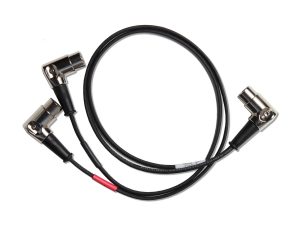
 MIDI Y-Cable for DMC Gen3
Artikel bestellen

Disaster Area Designs

MIDI Y-Cable for DMC Gen3

Art.Nr. 2979

€ 49,00

inkl. ges. MwSt., zzgl. Versandkosten


Versand Inland (Germany) € 5,90
Versandkosten international

Auf Lager


Einkaufswagen
Herstellerinformation
Allgemeine Sicherheitshinweise -Lesen Sie vor der Inbetriebnahme des Geräts die Bedienungsanleitung sorgfältig durch -Verwenden Sie eine für das Gerät geeignete Stromversorgung mit einzelgalvanischer Trennung -Bewahren Sie die Bedienungsanleitung für das Gerät sorgfältig auf -Verwenden Sie das Gerät nur für den dafür vorgesehenen Zweck -Das Gerät darf auf keinen Fall Wasser, Feuchtigkeit und extremen Temperaturen ausgesetzt werden -Drehen Sie alle Regler am Gerät vor der Inbetriebnahme auf die jeweilige Minimaleinstellung -Bewahren Sie das Gerät außerhalb der Reichweite von Kindern auf Elektrische Sicherheit -Vergewissern Sie sich, dass das Gerät für die Spannung in Ihrem Stromnetz ausgelegt ist -Verwenden Sie entweder das mitgelieferte Netzteil oder eine gleichwertige, von Fachleuten empfohlene Stromversorgung mit einzelgalvanischer Trennung -Bei längerer Nichtbenutzung sollte das Gerät von der Stromzufuhr getrennt werden -Bei Beschädigungen des Netzkabel ist von einer Benutzung des Gerätes abzusehen -Reparaturen am Netzkabel, der Stromzufuhr oder dem Gerät selbst dürfen ausschließlich von geschultem Fachpersonal durchgeführt werden -Sollte das Gerät mit Flüssigkeiten in Kontakt gekommen sein, besteht das Risiko eines elektrischen Schlages Hinweise zur Reparatur -Reparaturen dürfen ausschließlich von qualifiziertem Fachpersonal durchgeführt werden -Selbständiges Öffnen oder der Versuch einer Reparatur des Geräts führt kann eventuell zu schweren Verletzungen oder Schäden am Gerät führen und hat zur Folge, dass die Garantieleistung erlischt -Wenden Sie sich bei Funktionsstörungen oder Defekten an einen autorisierten Service-Techniker oder an den Verkäufer Warnhinweise -Öffnen Sie das Gerät nicht. Es enthält keine vom Benutzer zu wartenden Teile -Vorhandene Lüftungsschlitze am Gerät dürfen nicht blockiert sein, da ansonsten eine Überhitzung des Geräts und etwaige Folgeschäden drohen -Verwenden Sie das Gerät nicht in der Nähe von leicht entflammbaren Materialien oder Flüssigkeiten -Vermeiden Sie Schäden durch Gewitter oder etwaiger Über- bzw. Unterspannung des Stromnetzes, indem Sie das Gerät von der Stromzufuhr trennen -Das Gerät sollte nicht direkter Sonneneinstrahlung oder anderen Wärmequellen ausgesetzt werden -Stress und Hektik bestimmen unseren Lebensalltag. Sollten Sie einmal durch das Lesen von Gebrauchsanweisungen, Verbraucherhinweisen und EU-Richtlinien gestresst sein, versuchen Sie, durch einen längeren Aufenthalt in der Natur neue Kraft zu tanken. Empfehlung: Waldspaziergang, Sonnenbad, Urlaub -Lesen Sie Aphorismen von Arthur Schopenhauer und sinnieren Sie darüber General safety instructions -Read the operating instructions carefully before using the device -Use a power supply with single isolated connections suitable for the device -Keep the operating instructions for the device carefully -Only use the device for its intended purpose -The device must not be exposed to water, moisture or extreme temperatures under any circumstances -Turn all controls on the device to the minimum setting before using it -Keep the device out of the reach of children Electrical safety -Make sure that the device is designed for the voltage in your power supply -Use either the included power supply or a power supply with single isolated connections recommended by product specialists -If the device is not used for a longer period of time, it should be disconnected from the power supply -If the power cable is damaged, do not use the device -Repairs of the power supply or the device itself should only be carried out by specialists -If the device has come into contact with liquids, there is a risk of electric shock Notes on repairs -Repairs must be carried out by qualified personnel -Opening the device by yourself or attempting to repair it may result in serious injuries or damage to the device and will void any warranty claims -In case of malfunctions or defects, contact an authorized service technician or the seller Warnings -Do not open the device. It does not contain any parts that can be serviced by the user -Existing ventilation slots on the device must never be blocked due to risk of overheating and damage -Do not use the device near easily flammable materials or liquids -Attention of thunder and lightning: Avoid damaging the device by means of voltage irregularities in the power grid by disconnecting the device from the power supply -The device should not be exposed to direct sunlight or other heat sources -Should you ever find yourself stressed by reading instructions for use, consumer information and EU guidelines, try to recharge your batteries by spending some time in nature. We recommend: A walk in the park, a step in the dark – try getting away by escaping today -Remember: When you’re alone and life is making you lonely you can always go downtown -And finally: Wake up you sleepy head. Put on your shoes, shake up your bed Importiert von / Imported by: Cotton Musical Supply Vordergasse 15 35510 Butzbach Germany info@cms-music.de www.cms-music.net Hersteller / Manufacturer: Disaster Area Designs LLC 2018 Garner Station Blvd 27603 Raleigh NC USA Mail: shipping@disasterareadesigns.com www.disasterareadesigns.com

Disaster Area Designs MIDI Y-Cable for DMC Gen3

MIDI Y-Cable for DMC Gen3 Custom-made 2ft. MIDI input and output cable for the DMC Gen3 controllers. Each plug may be rotated to one of eight positions just like our Premium MIDI Cables for ease of pedalboard placement. The cable is slimmer in diameter than our standard cables for easy routing. — What does this cable do? — The Disaster Area MIDI Y Cable allows you to send MIDI data in to your DMC Gen3 controller, while at the same time allowing the controller to send data out. You only need this cable if you plan to control your Gen3 from another MIDI controller or a laptop with a MIDI interface. — Why on Earth would I want to connect a controller to my controller? — Great question! Maybe your band uses Pro Tools or Ableton for show control, in which case you could have your laptop change patches on your pedalboard using a Gen3 controller. Maybe you want to send MIDI clock from a master rather than generating it on the Gen3. Or maybe you want to use your older Gen2 controller as a dedicated looper control? Just connect its output to the plug labeled INPUT, and the other plug to the first device in your MIDI chain. The Gen3 will merge the data coming in provide a seamless experience. — Can I use this to connect two devices to my Gen3? — No. Daisy-chain your devices from the Gen3 MIDI output in the following manner: DMC Gen3 output -> Device 1 MIDI input, then Device 1 MIDI output -> Device 2 MIDI input. Repeat as needed for all of your remaining devices. — Does this cable work for my “Brand X” device? — The center connector on this cable plugs in to a Gen3 Disaster Area product ONLY, but the other two ends can plug into just about anything. Using this cable will convert the single MIDI port on your DMC or DPC Gen3 into MIDI IN and MIDI OUT ports. These IN and OUT ports may be connected to any standard MIDI device, so you can send messages into / thru the DMC Gen3 from another controller and out to another device.


Preise inkl. der gesetzlichen MwSt. Satzfehler und Irrtümer vorbehalten. Lieferung von Ware am Lager solange Vorrat reicht. Preise in Euro zzgl. Versandkosten. © Frank Post, Bruchwiesenstrasse 25, D-66111 Saarbrücken, Telefon 0049(0)681-5898564, Email info AT loopersparadise de

Page built in 0.162 Sec.